
loading

Professional solar camera supplier - VESAFE

TUYA APP Smart CCTV Dome Solar Security Camera 1
TUYA APP Smart CCTV Dome Solar Security Camera 2
TUYA APP Smart CCTV Dome Solar Security Camera 3
TUYA APP Smart CCTV Dome Solar Security Camera 4
TUYA APP Smart CCTV Dome Solar Security Camera 5
TUYA APP Smart CCTV Dome Solar Security Camera 6
TUYA APP Smart CCTV Dome Solar Security Camera 7
TUYA APP Smart CCTV Dome Solar Security Camera 1
TUYA APP Smart CCTV Dome Solar Security Camera 2
TUYA APP Smart CCTV Dome Solar Security Camera 3
TUYA APP Smart CCTV Dome Solar Security Camera 4
TUYA APP Smart CCTV Dome Solar Security Camera 5
TUYA APP Smart CCTV Dome Solar Security Camera 6
TUYA APP Smart CCTV Dome Solar Security Camera 7

TUYA APP Smart CCTV Dome Solar Security Camera

This camera supports up to 16 different monitoring screens simultaneously – making it ideal for large properties and commercial establishments. You can choose to install it as a single, standalone unit, or as part of a larger network of cameras for complete coverage.

The Q6 Solar-Powered Camera also features a powerful 10W solar panel that ensures continuous operation, even in areas with limited access to electricity. This means that you won't have to worry about the camera running out of power and leaving your property unprotected.

With its robust and durable design, Q6 Solar-Powered Camera is built to withstand the most challenging weather conditions. Whether it's rain, wind, or extreme temperatures, this camera will keep performing at its best – year after year.

5.0
design customization

    oops...!

    no product data.

    Go to homepage

    Compact Weatherproof Solar Surveillance 

    Keep your property secure 24/7 with a solar-powered TUYA app CCTV dome that delivers remote live view, instant motion alerts, and cloud/local recording for reliable, low-maintenance protection. Its compact dome shape and sleek modern style with weatherproof, vandal-resistant housing provide discreet, durable surveillance that blends into any environment. Packaged with a clear mounting kit and built from premium materials, the camera’s high-quality construction and organized packaging make installation fast and reliable.

    ● product desc 1

    ● product desc 2

    ● product desc 3

    ● product desc 4

    carousel-2

    Product Display

    carousel-2
    carousel-2
    Read More
    carousel-5
    carousel-5
    Read More
    carousel-7
    carousel-7
    Read More

    Reliable Solar Smart Surveillance

    carousel-3
    Solar Powered Autonomous Surveillance
    Efficient solar-charged battery delivers continuous, maintenance-light outdoor monitoring for reliable, off-grid operation day and night.
    未标题-2 (16)
    Weatherproof Durable Outdoor Design
    Rugged, weather-resistant housing withstands rain, dust, and extreme temperatures to ensure long-term outdoor reliability.
    未标题-3 (10)
    Intelligent Motion Detection Filtering
    PIR human detection and AI-assisted motion filtering reduce false alarms by accurately distinguishing people from pets and environmental motion.
    未标题-4 (5)
    Secure Remote App Access
    Tuya app enables quick Wi‑Fi setup, encrypted local/cloud storage, two-way talk, and instant smart alerts for privacy-conscious remote monitoring.

    Here are six 4-word subtitle options:

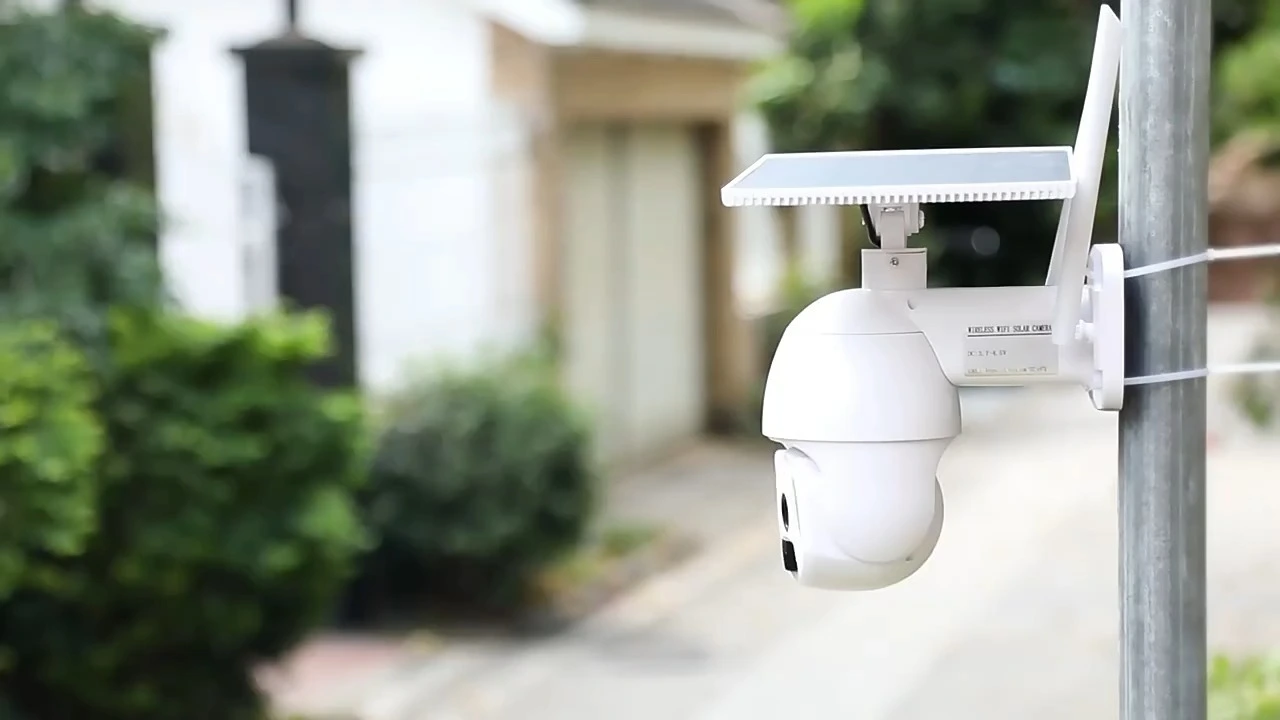
    The TUYA APP Smart CCTV Dome Solar Security Camera combines a weatherproof dome housing with solar-powered operation and Tuya app connectivity to provide continuous, energy-efficient remote surveillance. It delivers high-definition video, night vision, PIR motion and AI-based detection, two-way audio, instant push alerts and both cloud and local storage options for reliable, actionable security. Its compact, tamper-resistant dome design with an adjustable solar panel and flexible mounting enables unobtrusive exterior installation and long-term maintenance-free operation.

    ◎ product charact 1

    ◎ Solar Powered Surveillance

    ◎ Cloud App Control

    carousel-6

    Application Scenario

    application scenario 1
    Mount the solar-powered dome at your entrance to monitor vehicles and visitors without running cables; it delivers continuous power, instant motion alerts, and live video straight to the TUYA app so you never miss activity on your driveway. Built for outdoor use with weatherproof housing and infrared night vision, it provides reliable 24/7 protection in all conditions.
    application scenario 2
    Watch over children, pets, and outdoor gatherings in your backyard wire-free with solar-powered continuous operation and real-time streaming to the TUYA app, which also pushes motion notifications to your phone. Rugged weatherproof construction and night vision ensure clear visibility and peace of mind after dark.
    carousel-5
    application scenario 3
    Guard your small storefront and merchandise with off-grid solar surveillance that deters theft and records suspicious activity while sending live alerts through the TUYA app for immediate response. The camera's weatherproof design and night vision keep your shop protected around the clock, even in poor lighting or bad weather.
    carousel-7
    application scenario 4
    Secure cabins, barns, and other remote properties with a wire-free solar camera that provides continuous monitoring without grid power. Receive live view and motion alerts via the TUYA app while rugged, weatherproof night vision keeps the premises monitored day and night.

    Material Introduction

    The TUYA APP Smart CCTV Dome Solar Security Camera features a rugged housing made from an ABS+PC composite that provides impact resistance and UV stability for prolonged outdoor exposure. Its scratch-resistant polycarbonate dome preserves image clarity while resisting dents and abrasions. Anodized aluminum for the solar panel frame and mounting bracket, paired with stainless steel fasteners and silicone gaskets, ensures corrosion resistance and reliable weatherproof sealing.


    ◎ High-Impact ABS Housing 

    ◎ UV-Stabilized Polycarbonate Dome

    ◎ Weatherproof Stainless Encapsulation

    carousel-6

    FAQ

    1
    How do I set up the TUYA APP Smart CCTV Dome Solar Security Camera?
    Download the Tuya/Smart Life app, create or sign in to your account, and choose "Add Device." Put the camera into pairing mode (follow the quick-start guide — usually holding a button until an LED or voice prompt appears). Connect to your home 2.4 GHz Wi‑Fi network (most models do not support 5 GHz). Scan the camera QR code or follow the app’s step-by-step instructions to complete pairing. After pairing you can name the camera, set permissions, and enable push notifications. If pairing fails, try moving the camera closer to the router, use AP mode if offered, or reset the camera and retry.
    2
    How do motion detection and notifications work, and how can I reduce false alerts?
    The camera sends real-time alerts to the Tuya app when motion is detected. In the app you can adjust sensitivity, set detection schedules (only alert during certain hours), draw detection zones to focus on important areas, and enable advanced options if available (like human/PIR detection or AI-based person recognition). To reduce false alarms, lower sensitivity, avoid pointing the lens at moving trees or busy streets, set smaller detection zones, and enable smart detection features where supported.
    3
    How does night vision work and can the camera record color video at night?
    The camera uses infrared LEDs for black-and-white night vision when light is low. Many models also include a built-in spotlight or “color night vision” feature that turns on lights for full-color recording in dim conditions. Night vision is automatic based on ambient light; you can usually force it on/off or set brightness via the Tuya app. For best night performance, avoid pointing the camera directly into bright light sources and keep the lens clean.
    4
    How does the solar charging system work and how do I maintain battery life?
    The solar panel charges the camera’s internal battery so it can operate continuously. Position the solar panel where it receives maximum sunlight (typically south-facing in the Northern Hemisphere) and avoid shade from trees or buildings. Clean the solar panel surface periodically to ensure efficient charging. Battery life and recharge time depend on sunlight, weather, and usage (live view, recording, and push events use more power). If you experience low battery, temporarily connect to a wired power source (if supported) and check for firmware updates or power-hungry settings (e.g., continuous recording or high alert frequency).
    5
    What storage options are available and how do I access recorded footage?
    The camera typically supports local microSD card recording (check the manual for the supported max capacity) and/or cloud storage plans via Tuya’s cloud service. In the Tuya app you can access live view, event lists, and recorded clips; use the playback feature to review footage saved to microSD or cloud. Note that continuous (24/7) recording may require a larger card or cloud subscription, while event-triggered recording saves space by storing only motion events.
    6
    Where should I mount the camera for best coverage and how weatherproof is it?
    Mount the dome camera at a height that provides a clear, unobstructed view of the area you want to monitor (commonly 8–12 feet for door/driveway coverage). Angle it slightly downward to capture faces and license plates and avoid pointing directly at bright lights or reflective surfaces. Mount the solar panel in a separate, sunny location if needed and route the cable carefully. These solar security cameras are designed for outdoor use with weatherproof housings — check your product manual for the exact IP/weather rating — but you should still avoid extreme exposure (prolonged submersion) and perform periodic maintenance (clean lens and panel, check seals and mount bolts).
    MORE PRODUCTS
    no data
    Get in touch with us
    Just leave your email or phone number in the contact form so we can send you a free quote for our wide range of designs
    Related Products
    no data
    Contact us
    phone
    email
    wechat
    whatsapp
    Contact customer service
    Contact us
    phone
    email
    wechat
    whatsapp
    cancel
    Customer service
    detect