
loading

Professional solar camera supplier - VESAFE

Light Bulb Surveillance Camera Home Security Wireless Camera 1
Light Bulb Surveillance Camera Home Security Wireless Camera 2
Light Bulb Surveillance Camera Home Security Wireless Camera 3
Light Bulb Surveillance Camera Home Security Wireless Camera 4
Light Bulb Surveillance Camera Home Security Wireless Camera 5
Light Bulb Surveillance Camera Home Security Wireless Camera 1
Light Bulb Surveillance Camera Home Security Wireless Camera 2
Light Bulb Surveillance Camera Home Security Wireless Camera 3
Light Bulb Surveillance Camera Home Security Wireless Camera 4
Light Bulb Surveillance Camera Home Security Wireless Camera 5

Light Bulb Surveillance Camera Home Security Wireless Camera

Dual Lens Dual Screen Smart Bulb Camera
V380 Pro APP
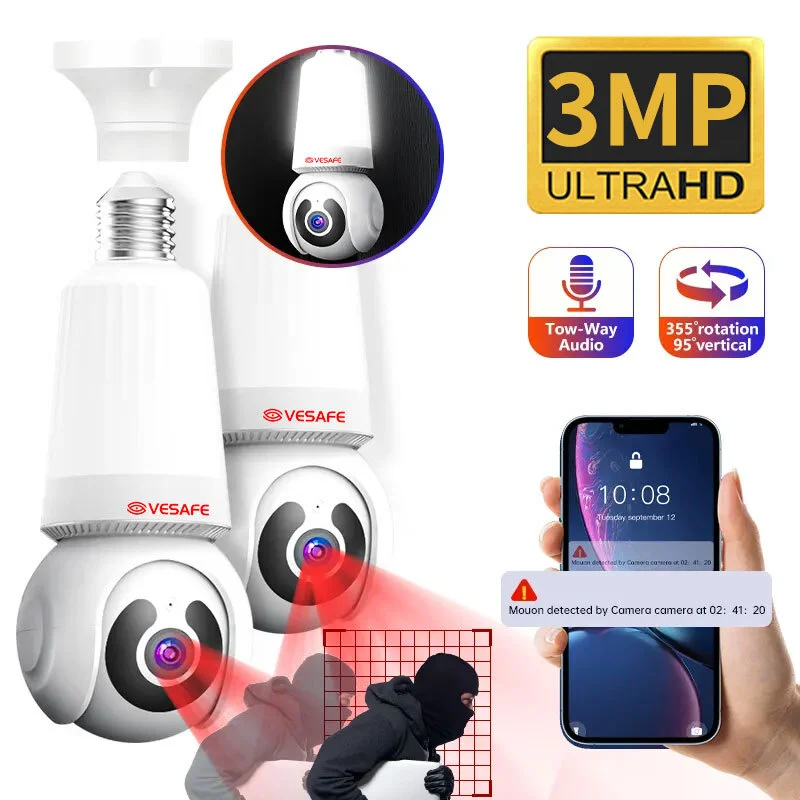
3MP HD pixels 
E27 Light Bulb Camera
support Micro SD card (128G) local storage video
Motion detection, motion tracking, humanoid detection
Horizontal direction: 350° Vertical direction: 90°
WIFI wireless transmission (support IEEE802.11b/g/n wireless protocol)
5.0
design customization

    oops...!

    no product data.

    Go to homepage

    Stylish Discreet HD Surveillance 

    This light-bulb-shaped wireless security camera screws into any standard socket to provide discreet, full-room monitoring without visible wiring. Packaged in a compact box with clear setup instructions, its frosted-glass finish and low-profile shape blend with home decor while durable materials and a high-quality lens deliver reliable day-and-night clarity. With wireless connectivity, motion-triggered alerts, two-way audio and flexible cloud or local storage, it gives fast notifications and simple evidence access for continuous peace of mind.

    ● product desc 1

    ● product desc 2

    ● product desc 3

    ● product desc 4

    carousel-2

    Product Display

    carousel-2
    carousel-2
    Read More
    carousel-5
    carousel-5
    Read More
    carousel-7
    carousel-7
    Read More

    360° Smart Wireless Surveillance

    carousel-3
    product advantages 1
    The camera is cleverly concealed inside a standard E26/E27 LED bulb, providing normal room illumination while keeping surveillance discreet and unobtrusive. Installation is as simple as screwing in a light bulb, and the LED design keeps power use low for everyday lighting needs.
    未标题-2 (16)
    product advantages 2
    You get crisp HD video with wide‑angle or panoramic coverage so a single unit monitors large rooms with clear detail. Built‑in night vision and Wi‑Fi remote viewing let you check live feeds from your phone anytime, day or night.
    未标题-3 (10)
    product advantages 3
    Motion detection sends real‑time alerts to your device and automatically activates two‑way audio so you can hear what’s happening and speak through the camera. That immediate interaction helps deter intruders and lets you respond to visitors or family members on the spot.
    未标题-4 (5)
    product advantages 4
    Footage can be saved locally or to the cloud with encrypted transmission to protect your privacy and prevent unauthorized access. The system is plug‑and‑play and designed to work with common smart‑home platforms for reliable, privacy‑focused home security.

    Discreet Wireless Bulb Surveillance

    This light bulb surveillance camera combines an energy-efficient LED bulb with a concealed wide-angle HD camera in a standard screw-in housing, allowing discreet installation in regular light sockets while maintaining a compact, heat-dissipating structure. It connects to home Wi‑Fi for live streaming and remote viewing via a mobile app, offers two-way audio, motion-triggered recording and alerts, and supports local SD card or cloud storage for continuous or event-based recording. By replacing an existing bulb without extra wiring, it delivers simple, low-cost security coverage and peace of mind through unobtrusive monitoring, easy setup, and dual-purpose illumination.

    ◎ Discreet Integrated Monitoring

    ◎ Intelligent Motion Alerts

    ◎ Flexible Storage Options

    carousel-6

    Application Scenario

    Living Room Peacekeeper Camera
    Screws into a standard light socket to provide discreet 360° coverage of the entire living area, blending into existing fixtures. It sends motion alerts and offers mobile live view so you can remotely supervise family activity in real time.
    Hallway Wide Angle Guardian
    Installed in a hallway, the wide-angle lens detects movement and captures anyone passing through common corridors. Instant motion notifications and live streaming to your phone keep you updated on activity as it happens.
    carousel-5
    Entryway Smart Door Monitor
    Mounted above an entryway, the camera monitors doors and porches to help you check deliveries and visitors without obstructing the entry. Motion-triggered alerts and remote live view let you verify who’s at the door before you respond.
    carousel-7
    Package And Pet Observer
    Aimed at porches or indoor pet areas, the camera provides broad coverage to watch deliveries and monitor pets with motion detection. Smartphone streaming allows you to check package status or your pet’s behavior in real time to ensure they remain safe.

    Material Introduction

    The bulb-style camera uses a fire-retardant ABS and polycarbonate outer shell with a frosted diffuser to conceal the lens while protecting internals. An aluminum heat sink and well-mounted PCBs with LED chips and image sensor components manage heat and ensure stable electronic performance. A standard metal E27 base (brass/steel) combined with silicone seals provides a secure socket connection and helps resist everyday humidity.


    ◎ Bulb Shell & Heat Sink 

    ◎ Optical Dome & Diffuser

    ◎ Internal PCB, Contacts & Seals

    carousel-6

    FAQ

    1
    How do I install and set up a light bulb surveillance camera?
    Turn off the light, screw the camera bulb into a standard E26/E27 socket (or the socket type specified), restore power, download the manufacturer’s app, and follow the in-app pairing steps (usually create an account, connect to your 2.4 GHz Wi‑Fi, and scan or add the device). After pairing, position the camera by rotating the bulb to get the desired view, adjust settings like motion detection and recording mode in the app, and update firmware if prompted.
    2
    Where is the best place to install this camera and what scenarios is it suitable for?
    Ideal indoor locations include entryways, living rooms, hallways, nurseries (with privacy considerations), home offices, garages and short-term rentals (Airbnb). If the model is weatherproof (check IP rating), it can work in covered outdoor spots like porches. Choose a socket high enough to give a wide view and avoid direct sunlight or reflective surfaces that degrade image quality.
    3
    How does recording and storage work — local SD card vs cloud?
    Many bulb cameras support local microSD card storage for continuous or motion-triggered loop recording (check max supported card size), and some offer optional cloud storage subscriptions for off-site retention and easy sharing. Use motion-triggered recording to save space, enable event notifications in the app, and periodically back up important clips if you rely on local storage only.
    4
    Can the bulb camera provide good night-time footage while still acting as a light?
    Models typically combine LED lighting and either IR or low-light sensors. In low light the camera may switch to night mode (IR) for black-and-white footage while the light can remain on or dim depending on settings. Check the product specs for night vision range and whether the light can be dimmed or scheduled so you can balance illumination and image clarity.
    5
    What privacy and legal issues should I consider when using a light bulb camera?
    Notify visitors, family members or tenants that recording may occur and avoid placing cameras in private areas such as bathrooms or bedrooms if that violates local law or personal privacy. Secure the device by using a strong unique password, enabling two-factor authentication if available, keeping firmware up to date, and using a separate guest Wi‑Fi network when possible.
    6
    My camera keeps disconnecting or the video is laggy — how do I troubleshoot?
    Ensure the camera is on a stable 2.4 GHz Wi‑Fi network with good signal strength (move the router or use a Wi‑Fi extender), confirm the socket supplies continuous power, reboot the camera and router, check for app/firmware updates, reinsert or format the SD card if recording issues occur, and reset the device to factory settings and re-pair if needed. If problems persist, consult the manufacturer’s support for device-specific diagnostics.
    MORE PRODUCTS
    no data
    Get in touch with us
    Just leave your email or phone number in the contact form so we can send you a free quote for our wide range of designs
    Related Products
    no data
    Contact us
    phone
    email
    wechat
    whatsapp
    Contact customer service
    Contact us
    phone
    email
    wechat
    whatsapp
    cancel
    Customer service
    detect