
loading

Professional solar camera supplier - VESAFE

ICsee 20x Zoom Wifi Ip Security Ptz CCTV Camera 1
ICsee 20x Zoom Wifi Ip Security Ptz CCTV Camera 2
ICsee 20x Zoom Wifi Ip Security Ptz CCTV Camera 3
ICsee 20x Zoom Wifi Ip Security Ptz CCTV Camera 4
ICsee 20x Zoom Wifi Ip Security Ptz CCTV Camera 5
ICsee 20x Zoom Wifi Ip Security Ptz CCTV Camera 1
ICsee 20x Zoom Wifi Ip Security Ptz CCTV Camera 2
ICsee 20x Zoom Wifi Ip Security Ptz CCTV Camera 3
ICsee 20x Zoom Wifi Ip Security Ptz CCTV Camera 4
ICsee 20x Zoom Wifi Ip Security Ptz CCTV Camera 5

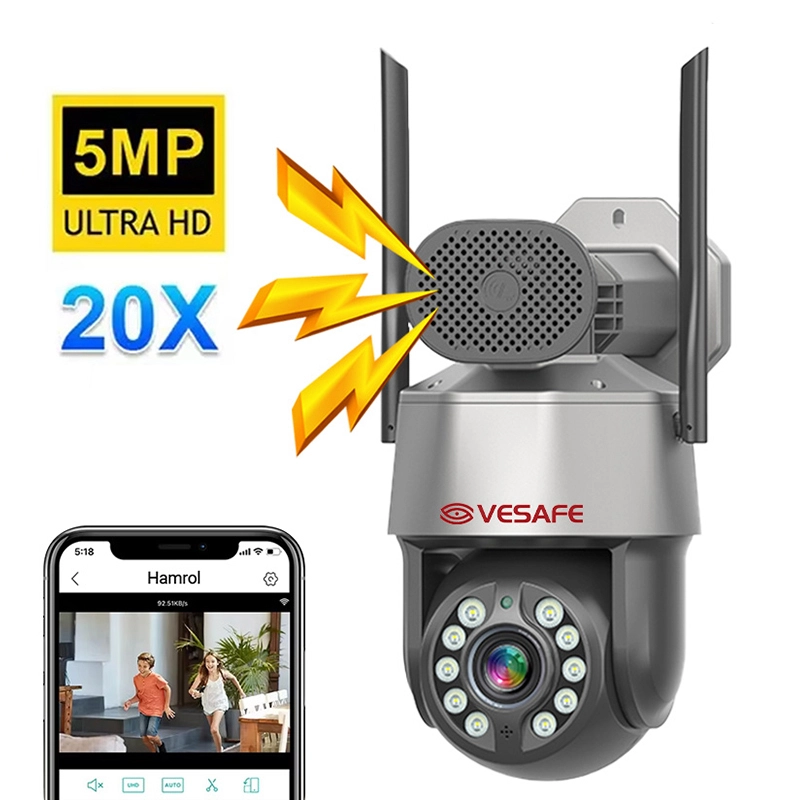
ICsee 20x Zoom Wifi Ip Security Ptz CCTV Camera

Main feature:

* 5MP 20X Zoom

* AI human tracking, human detection

* Built-in Mic & speaker, support two-way audio

* Dual light,day & night full color vision

* TF card max 256G

* Push notification to iPhone/Android APP

* APP: ICSEE

5.0
design customization

    oops...!

    no product data.

    Go to homepage

    Sharp 20x Sleek Surveillance 

    The ICsee 20x Zoom WiFi IP PTZ camera gives you reliable, high‑definition remote surveillance and fast identification with 20x optical zoom, smooth pan/tilt control and dependable low‑light performance for round‑the‑clock protection. Its compact dome shape, weatherproof, high‑quality metal housing and sleek modern style allow discreet indoor or outdoor placement while ensuring long-term durability. Secure foam packaging and an included mounting kit make installation quick and damage‑free, so you get professional security performance straight out of the box.

    ● product desc 1

    ● product desc 2

    ● product desc 3

    ● product desc 4

    carousel-2

    Product Display

    carousel-2
    carousel-2
    Read More
    carousel-5
    carousel-5
    Read More
    carousel-7
    carousel-7
    Read More

    Smart 20x PTZ Security

    carousel-3
    product advantages 1
    True 20x optical zoom brings distant subjects into crisp focus without digital degradation, enabling reliable identification and detailed long-range imaging. This precision supports dependable, around-the-clock monitoring so critical events and evidence are captured clearly.
    未标题-2 (16)
    product advantages 2
    Fluid pan/tilt motion provides seamless scanning across wide areas to minimize blind spots and keep moving targets in frame. Built-in preset patrols let you automate surveillance routes and quickly return to points of interest for easy target tracking.
    未标题-3 (10)
    product advantages 3
    Dual Wi‑Fi and IP connectivity let you control the camera, view live video, and access recordings remotely via a mobile app or network recorder. This flexible setup simplifies installation and allows secure, multi-user monitoring from anywhere on the network.
    未标题-4 (5)
    product advantages 4
    Smart motion detection with automatic tracking locks onto moving objects and follows them through the field of view, increasing the chance of capturing important events. Instant alerts and broad recorder compatibility speed response times and make integration with existing systems straightforward.

    Here are several four-word subtitle options:

    The ICsee 20x Zoom WiFi IP PTZ CCTV Camera combines a 20x optical zoom lens with smooth pan-tilt-zoom motorized control and dual-band wireless networking to provide high-resolution, flexible surveillance coverage. It adds value through integrated IR night vision, smart autofocus, motion detection, two-way audio, and remote mobile/web access for proactive monitoring and easy management. Housed in weather-resistant casing with low-noise mechanics, microSD storage support, and multiple power/network options, the unit offers durable construction, simple installation, and reliable continuous operation.

    ◎ 20x Optical Zoom

    ◎ Smooth PTZ Mechanics

    ◎ Wireless Remote Monitoring

    carousel-6

    Application Scenario

    application scenario 1
    Ideal for homeowners who want to watch front doors and yards, the ICsee PTZ camera provides Wi‑Fi remote access so you can view live footage and recordings on your phone or PC. With 20x optical zoom and pan/tilt control, you can clearly identify faces and packages for quick response or evidence collection.
    application scenario 2
    In small shops the camera continuously monitors counters and aisles, streaming video over Wi‑Fi so owners can spot activity from anywhere and review recordings when needed. The 20x zoom captures clear facial features and close-up details to deter theft and support loss‑prevention.
    carousel-5
    application scenario 3
    Install it in office lobbies and entry points to verify visitors in real time, using PTZ controls and Wi‑Fi access to check the view on mobile devices or desktop stations. The 20x zoom lets staff confirm identities, record interactions, and escalate any suspicious incidents quickly.
    carousel-7
    application scenario 4
    Cover parking areas and lots with long‑range surveillance that streams high‑resolution video over Wi‑Fi and stores footage for later review. Its 20x zoom reliably captures license plates and distant details to aid investigations and improve lot security.

    Material Introduction

    The camera's outer housing is die-cast aluminum with an anodized finish to resist corrosion and help dissipate heat. The 20x zoom module uses multi-coated precision glass optics, while internal connectors and PCB traces rely on copper and brass for stable electrical performance. Silicone sealing gaskets and stainless-steel mounting hardware provide robust weather resistance and long-term outdoor durability.


    ◎  

    ◎ 

    ◎ 

    carousel-6

    FAQ

    1
    How do I set up the ICsee 20x Zoom WiFi IP PTZ camera for the first time?
    Power the camera (via its adapter or PoE if your model supports it), install the ICsee app on your phone, and follow the in-app “Add Device” or scan the QR code on the camera. During setup choose your network (most consumer Wi‑Fi PTZ cameras require a 2.4 GHz SSID), enter your Wi‑Fi password, and complete the guided steps. If Wi‑Fi fails, try a wired Ethernet connection for initial setup and check the camera’s user manual for model-specific steps.
    2
    How do I control pan, tilt and 20x zoom remotely?
    Use the ICsee mobile app or the camera’s web/NVR interface to drag or use on‑screen joystick controls for pan/tilt and the zoom buttons or pinch gestures for optical zoom. You can typically set and recall presets, define patrol/tour paths, and adjust PTZ speed. For more precise control, use a compatible NVR or a joystick controller if your installation requires professional operation.
    3
    What recording and storage options are available, and how do I review footage?
    The camera usually supports local Micro SD cards (check your model for maximum size), recording to a compatible NVR, or cloud storage (subscription may be required). In the ICsee app you can configure continuous, scheduled, or event (motion) recording and use the playback feature to review clips or export video. Make sure to confirm supported storage types and retention limits for your specific model.
    4
    Can I use this camera outdoors and which application scenarios is it best for?
    Many 20x PTZ Wi‑Fi cameras are built for outdoor use and are ideal for wide-area monitoring: parking lots, building perimeters, large yards, construction sites, and warehouse exteriors. They’re also useful indoors for large retail spaces, auditoriums, and gymnasiums. Verify the IP rating (e.g., IP66/IP67) and operating temperature range in your camera’s specs to ensure it suits outdoor conditions.
    5
    How do motion detection and alert features work, and how can I customize them?
    In the ICsee app you can enable motion detection or smart alerts, set sensitivity levels, and define detection zones to reduce false alarms. When an event is detected the camera can trigger recording, send push notifications to your phone, or email alerts (if supported). Experiment with sensitivity and zone setup in your specific environment (avoiding busy roads or trees) to balance detection rate and false positives.
    6
    What security and maintenance steps should I follow to keep the camera safe and reliable?
    Change the default admin password immediately and use a strong, unique password for your camera and Wi‑Fi network. Keep firmware up to date through the vendor’s app or website, enable any available two‑factor authentication, and place the camera on a segmented network or VLAN if possible. Periodically check mountings, clean the lens, and review logs or recordings to ensure the device is operating correctly.
    MORE PRODUCTS
    no data
    Get in touch with us
    Just leave your email or phone number in the contact form so we can send you a free quote for our wide range of designs
    Related Products
    no data
    Contact us
    phone
    email
    wechat
    whatsapp
    Contact customer service
    Contact us
    phone
    email
    wechat
    whatsapp
    cancel
    Customer service
    detect